Skip to content
Menu
Learning Technologies (Archive)
  • Home
  • Web Resources
    • Blogs
      • How To – Blogs & Websites
    • Websites – School & District
    • MyEd Teacher Resources
    • O365 Resources
    • TEAMS and 365
    • Fast ForWord Intervention
  • Apps / Software
    • Apps Supporting Story
    • Creativation -Digital Story with Green Screen
      • Set Up Your Green Screen Kit
      • How to Create a Video Story
      • Story Examples using Green Screen
    • IPAD EVERYTHING
      • Top “22” Apps for 2022
      • Apps Supporting Story
      • Green Screen – Curiosity Engaged
        • Set Up Your Green Screen
        • How to Create a Video Story
        • Story Examples using Green Screen
        • Creativation – Studio Recordings
    • All The Right Type – ONLINE
    • Audacity
    • Images & Video
    • Inspiration
    • Kidspiration
  • Curricula
    • ADST
      • All The Right Type – ONLINE
      • 3D Design + Printing
      • Coding
        • BeeBots
        • micro:bits
        • Minecraft for Education
        • Spheros
    • All The Right Type – ONLINE
    • Core Competencies
    • Curricular Templates
    • Communicate Learning via Digital Portfolios
    • Digital Literacy
    • Team O365 & Makerspaces Writing
    • Literacy
      • Literature Circles
      • Performance Standards
      • Words Their Way
      • Writing Workshop
        • Assessment Organization
    • Tech Workflows
    • Visual Literacy
    • Project Stories Unfolded
Learning Technologies (Archive)

App #8 of “10 Apps to Countdown Season”

Posted on December 13, 2013December 13, 2013

App #8:  Image editors are the tools that help your ordinary images dance off pages. IrfanView is a free program (on your school computers) that does a variety of basics like compression.  I love the “batch conversion” feature when I need a ton of images resized for the web.  (click here for instructions)

picmonkey_icon

When I need to add pizzazz to my images, I go to PicMonkey. This simple online editor uses a drag-and-drop display that is easy to master.  Every change you make shows immediately.  The site requires no signup and is used successfully with students as early as Kindergarten, not to mention all teachers.  More importantly, you save your images anywhere you wish.
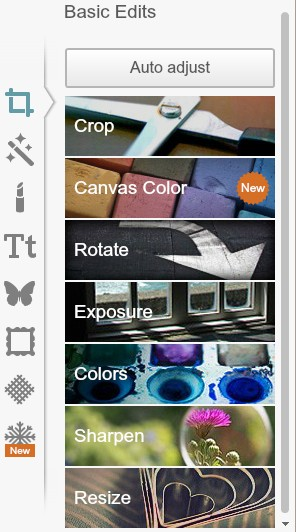
 

picmonkey_editor


The Basic Editor gives quite a few options to choose such as Crop, Color, Rotate, Resize.  Each option opens up further options giving you lots of choice including the ability to upload your own layers and special effects.

picmonkey_slider


Most all areas use a slider for control.  When you like what you see, press ‘Apply’ and you now have a brand new image – something that you can call your very own! (This is definitely a fan favourite in our workshops. Just imagine adding this to powerpoint, publishing pieces, newsletter reports or even bulletin boards.)


Click here for instructions on using PicMonkey.


How can you see this tool being used in your classes?

Leave a Reply Cancel reply

Your email address will not be published. Required fields are marked *

NEW: Burnaby Learning Community Team

Archive Content

  • MyEd Teacher Resources
  • Websites – School & District
  • Blogs – HOW TO
    • Blog as Story
  • IPAD EVERYTHING
    • Apps Supporting Story
    • Top “22” Apps for 2022
    • Profiles on iPads Explained
    • iPad Workflows
  • Creativation -Digital Story with Green Screen
    • Set Up Your Green Screen Kit
    • How to Create a Video Story
    • Story Examples using Green Screen
    • Creativation – Studio Recordings
  • Assessment Series – Katie White
  • Curricula Templates
  • Digital Citizenship
  • Digital Literacy
  • Innovative Teaching & Learning
  • Tools that Make a Difference

Archives

Contact Our Team

Lucky Saini  (District Vice Principal Educational Technology)

Michelle Mactavish  (Education Technology Support Teacher)

©2026 Learning Technologies (Archive) | WordPress Theme by Superbthemes.com