Skip to content
Menu
Learning Technologies (Archive)
  • Home
  • Web Resources
    • Blogs
      • How To – Blogs & Websites
    • Websites – School & District
    • MyEd Teacher Resources
    • O365 Resources
    • TEAMS and 365
    • Fast ForWord Intervention
  • Apps / Software
    • Apps Supporting Story
    • Creativation -Digital Story with Green Screen
      • Set Up Your Green Screen Kit
      • How to Create a Video Story
      • Story Examples using Green Screen
    • IPAD EVERYTHING
      • Top “22” Apps for 2022
      • Apps Supporting Story
      • Green Screen – Curiosity Engaged
        • Set Up Your Green Screen
        • How to Create a Video Story
        • Story Examples using Green Screen
        • Creativation – Studio Recordings
    • All The Right Type – ONLINE
    • Audacity
    • Images & Video
    • Inspiration
    • Kidspiration
  • Curricula
    • ADST
      • All The Right Type – ONLINE
      • 3D Design + Printing
      • Coding
        • BeeBots
        • micro:bits
        • Minecraft for Education
        • Spheros
    • All The Right Type – ONLINE
    • Core Competencies
    • Curricular Templates
    • Communicate Learning via Digital Portfolios
    • Digital Literacy
    • Team O365 & Makerspaces Writing
    • Literacy
      • Literature Circles
      • Performance Standards
      • Words Their Way
      • Writing Workshop
        • Assessment Organization
    • Tech Workflows
    • Visual Literacy
    • Project Stories Unfolded
Learning Technologies (Archive)

Webspiration in the Classroom

Posted on February 8, 2012February 7, 2012

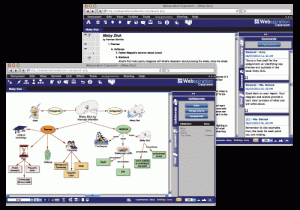
If you’ve used Inspiration, you may want to venture to use the web version which will allow your students to access this Visual Thinking, Concept Mapping & Writing tool from home.  Webspiration  is an ONLINE  tool with features that assist students in capturing ideas, organizing information, diagramming processes, and developing writing.  Files can move from Inspiration to Webspiration seemlessly and onto MS Word or Google Docs.  I would recommend this tool for Intermediate students and up.

In addition, this tool can assist students:

  • provide multiple means of action and expression
  • guide information processing
  • help map out ideas and organize outlines
  • promote collaboration online with peers
What does some research say?
Studies such as, “Concept mapping : does it promote meaningful learning in science?”(Hembling, 2009),  show that there is an increase in content performance for students who had been exposed to concept mapping over the course of their educational experiences.  In fact, many go on to using this strategy when they continue in post secondary studies and/or professional work.  

How do I get started:  Upon consultation, The Learning Technologies team will help you introduce this tool to you and your students.  To obtain a user id/password, email Francine.Giacomazza@sd41.bc.ca.   If you have an ID, please feel to get started at http://www.webspirationclassroom.com

Leave a Reply Cancel reply

Your email address will not be published. Required fields are marked *

NEW: Burnaby Learning Community Team

Archive Content

  • MyEd Teacher Resources
  • Websites – School & District
  • Blogs – HOW TO
    • Blog as Story
  • IPAD EVERYTHING
    • Apps Supporting Story
    • Top “22” Apps for 2022
    • Profiles on iPads Explained
    • iPad Workflows
  • Creativation -Digital Story with Green Screen
    • Set Up Your Green Screen Kit
    • How to Create a Video Story
    • Story Examples using Green Screen
    • Creativation – Studio Recordings
  • Assessment Series – Katie White
  • Curricula Templates
  • Digital Citizenship
  • Digital Literacy
  • Innovative Teaching & Learning
  • Tools that Make a Difference

Archives

Contact Our Team

Lucky Saini  (District Vice Principal Educational Technology)

Michelle Mactavish  (Education Technology Support Teacher)

©2026 Learning Technologies (Archive) | WordPress Theme by Superbthemes.com