


App #9: In our effort to highlight the SAMR Model of integration of technology, we’ve been considering what activities might fit into Redefinition (technology that allows creation of new tasks, previously inconceivable).
What activities might have significant impact to student outcomes? The “tell your story” concept remains one of the powerful ways we have to teach others, to increase audience, to learn new processes, to share expert knowledge in safe ways (consider also that shy student in your class).
Animations are live and well. While many are found in game environments, why not connect our learning outcomes above to the creation of animations – and no, you won’t spend a ton of time learning software! Tellagami is an app for ipad or android (love that) and produces animated characters (much like Voki or other avatar programs) that can be saved to the camera library, imported into other apps or uploaded to a blog or other website.
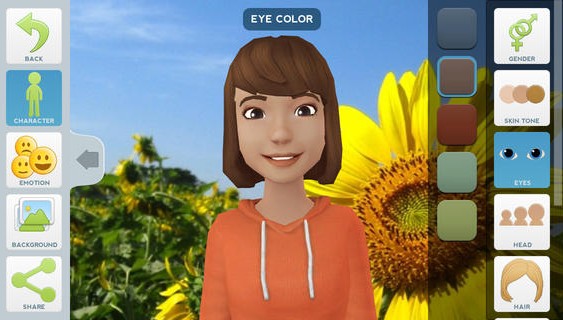
Have students create a teaching session or speech (in another language like French, Spanish, etc.) and create a gami to deliver the content. How about the significance of a historic event via a gami? Complete a biography of a personal hero? Tell a story from the first person perspective. Or how about in Special Ed, where a student might need lots of practice in speaking. Capturing and “freezing words in time” offers a great way to reflect upon both speech and ideas.
What makes this app a ‘cut above’ are several things: ability to insert own backgrounds (including drawings), ability to save to camera library and no wifi needed unless you wish to upload to a site. This allows for so many other possibilities to import to other apps like Explain Everything, iMovie or transferred to a computer (mpeg4) – now we have to talk about workflow. (Stay tuned for more on this in later posts.)
What can you use Tellagami to do, to learn, to share?