
Ms Graham’s Students: Curation of Resources
For your project you will be collecting key resources for your project. These resources should be reputable, and come from a variety of forms. Consider using video, text, images and even audio to help give yourself a complete picture of your topic.
We are going to explore using Wakelet as a curation tool.
Consider looking at the following sites:
This Wakelet has a number of sites to check out including:
- Google Arts & Culture offers some amazing Ancient Collections. Here is one from the British Museum.
- National Geographic has some wonderful videos.
- Crash Course has some videos on many ancient civilisations.
- Instead of using Wikipedia as a source- check out its References at the bottom of the article. Britannica and World Book online offer more reliable information, but these should be only starting points. Image Quest is a great resource tool for images.
Ms Clayton: Online Resources
Hello Ms Clayton’s students! Here is the link to the British Museum that is a treasure trove of artifacts that are easy to search.
Ms Shivji: Where would we like to visit? A Multi-Modal Project
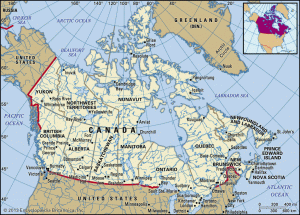
- Click here to see a top 10 video for places to visit in Canada.
- Click here to access some sites and information on the different provinces in Canada.
- Click here for access to online encyclopedias.
- Ms Shivji will give you the note-taking sheet.

Ms Moxon: The 60’s & 70’s: Times of Turmoil
Tools to create your Digital Infographic
- Gale Database World HistoryTopic Search: Click here.
- Image Quest is a great place for quality digital images.
- To make your Infographic consider trying Canva for Education.
- Tips on How to design an Infographic.
- A How to video on Canva .and a short video on how to edit using Canva. There are many quick short how to videos on the Canva tutorial page.
Ms Miller’s Class: Creating a Video Essay
- Click here to see the How to edit on iMovie using IOS. This video is especially useful as you can scroll to the different sections that go into detail on key parts of the program.
Searching out Quality and Rights Cleared Images
There are a number of potential ways of find images that are high quality and rights cleared images.
- We have access to Britannica Online Image Quest. This resource has a great search engine which allows you to search subjects and shapes and create citations. Click here to access.
- Pixabay is an online resource that offers some rights-free images. People can choose to sign up or search as a guest. Like Google, it does also have adult content so be aware.
- Google Image search does offer a search with a rights cleared options. Note that just because an image can be “googled” does not mean you have the permission to use it.